Production monitoring
ranklint audit --url https://prod --mode monitor — for cron/schedules. Exit is always 0: prod monitoring never fails the pipeline, it alerts instead. Flow: audit → enrichment → diff against the last stored report → save by timestamp → alerts only when newIssues > 0.
- CrUX (
RANKLINT_CRUX_API_KEY) — field Core Web Vitals of the origin: LCP, CLS, INP of real users. - Search Console URL Inspection — up to 10 pages: verdict, coverageState, indexingState, rich-results issues. Auth: a ready token
RANKLINT_GSC_TOKENor a service accountRANKLINT_GSC_KEY_FILE(an RS256 JWT built on node:crypto with zero dependencies, iat shifted −30 s for clock skew). - Alerts: Slack webhook and/or Telegram (bot token + chat id) — payloads built by
slackPayload/telegramText. - Storage: fs (default) or s3 with
keeprotation; trend —ranklint history.
Standalone repo, any stack. The CLI has no Nuxt dependency: a repo with package.json (ranklint devDependency), ranklint.config.ts (site.url, robots.mode: 'external', monitor) and a scheduled job monitors the whole domain. GitHub: uses: aakazancev/ranklint/.github/workflows/monitor.yml@main with pages: true publishes the html report to GitHub Pages; GitLab: extends: .ranklint-monitor + a pages job extending .ranklint-pages on a pipeline schedule. --html-output / --json-output write the full report next to the diff.
Standalone monitor repo (any stack)
The CLI does not depend on Nuxt: a tiny repo with a config and a scheduled job monitors a whole domain, whatever it is built with, and publishes the latest report to Pages.
seo-monitor/
  package.json          { "devDependencies": { "ranklint": "^0.5.0" } }
  ranklint.config.ts
  .github/workflows/monitor.yml   or   .gitlab-ci.yml
import { defineRanklintConfig } from '@ranklint/core'

export default defineRanklintConfig({
  site: { url: 'https://example.com' },
  crawl: { maxPages: 2000, ignore: ['/admin/**', '/api/**'] },
  robots: { mode: 'external', expect: { indexable: true, sitemaps: ['https://example.com/sitemap.xml'] } },
  monitor: { storage: 'fs', dir: '.ranklint/reports', keep: 60 },
})
GitHub Actions (report at https://<owner>.github.io/<repo>/, enable Pages → Source: GitHub Actions once):
on:
  schedule: [{ cron: '0 6 * * *' }]
  workflow_dispatch:
permissions:
  contents: read
  pages: write
  id-token: write
jobs:
  seo:
    uses: aakazancev/ranklint/.github/workflows/monitor.yml@main
    with: { url: 'https://example.com', pages: true }
    secrets: inherit
GitLab CI (report at the project's Pages URL; the job must be named pages):
include:
  - remote: 'https://raw.githubusercontent.com/aakazancev/ranklint/main/presets/gitlab-ci/seo.yml'

seo:monitor:
  extends: .ranklint-monitor
  variables:
    RANKLINT_URL: https://example.com

pages:
  extends: .ranklint-pages
  needs: [seo:monitor]
Add a pipeline schedule (CI/CD → Schedules) — both jobs run only on schedule. Monitor mode never fails the pipeline: it diffs against the previous stored report and alerts (Slack/Telegram via RANKLINT_SLACK_WEBHOOK, RANKLINT_TELEGRAM_BOT_TOKEN + RANKLINT_TELEGRAM_CHAT_ID) only on new issues. --html-output / --json-output write the full report next to the diff; ranklint history --dir .ranklint/reports prints the trend. ranklint dashboard builds a trend site with charts, see below.
Trend dashboard
ranklint dashboard turns the stored monitor reports into a static site: <out>/index.html with the trend and <out>/runs/<key>.html with the full html report of every run. One file per page with data, styles and script inline; the only external resource is the Google Fonts stylesheet, and without it the pages fall back to system fonts. Dark theme, works at phone width without horizontal scrolling.
| Flag | Default | What it does |
|---|---|---|
--dir | monitor.dir or .ranklint/reports | stored reports (fs storage) |
--out | ranklint-dashboard | output directory |
--limit | all | use only the N latest reports |
--run-url | — | adds a "Run audit" button, e.g. the CI page that starts a pipeline |
--logo | — | your logo instead of the ranklint wordmark: a local .png, .svg, .jpg, .jpeg or .webp file up to 200 KB (embedded as a data URI) or an http(s) URL. A small "powered by ranklint" link then appears at the bottom |
--brand-name | — | name shown next to the logo, also used as its alt text |
--accent | #b4f13c | accent color as #rgb or #rrggbb: buttons, active filters, links, chart lines and fix hints. Severity colors stay the same; the button text turns black or white for contrast |
--cwd | — | where to look up ranklint.config |
With your own brand and a button that starts the CI pipeline:
ranklint dashboard --dir public/reports --out public \
  --logo brand/logo.svg --brand-name "Example Inc." --accent "#3b82f6" \
  --run-url "$CI_PROJECT_URL/-/pipelines/new"
The left rail shows the site, the time of the last run, the "Run audit" button and the readouts: errors, warnings, info, pages and average Lighthouse performance, each with the delta to the previous run and a bar with a tick at the previous value. The panels to the right are:
- new and fixed issues since the previous run, grouped by rule, errors first;
- charts over time: errors and warnings, average Lighthouse scores, CrUX LCP and INP. Without CrUX data the panel explains how to enable it with
RANKLINT_CRUX_API_KEY; - the top rules and Lighthouse performance by page;
- the issues explorer for the last run;
- the archive of runs with links to their reports.
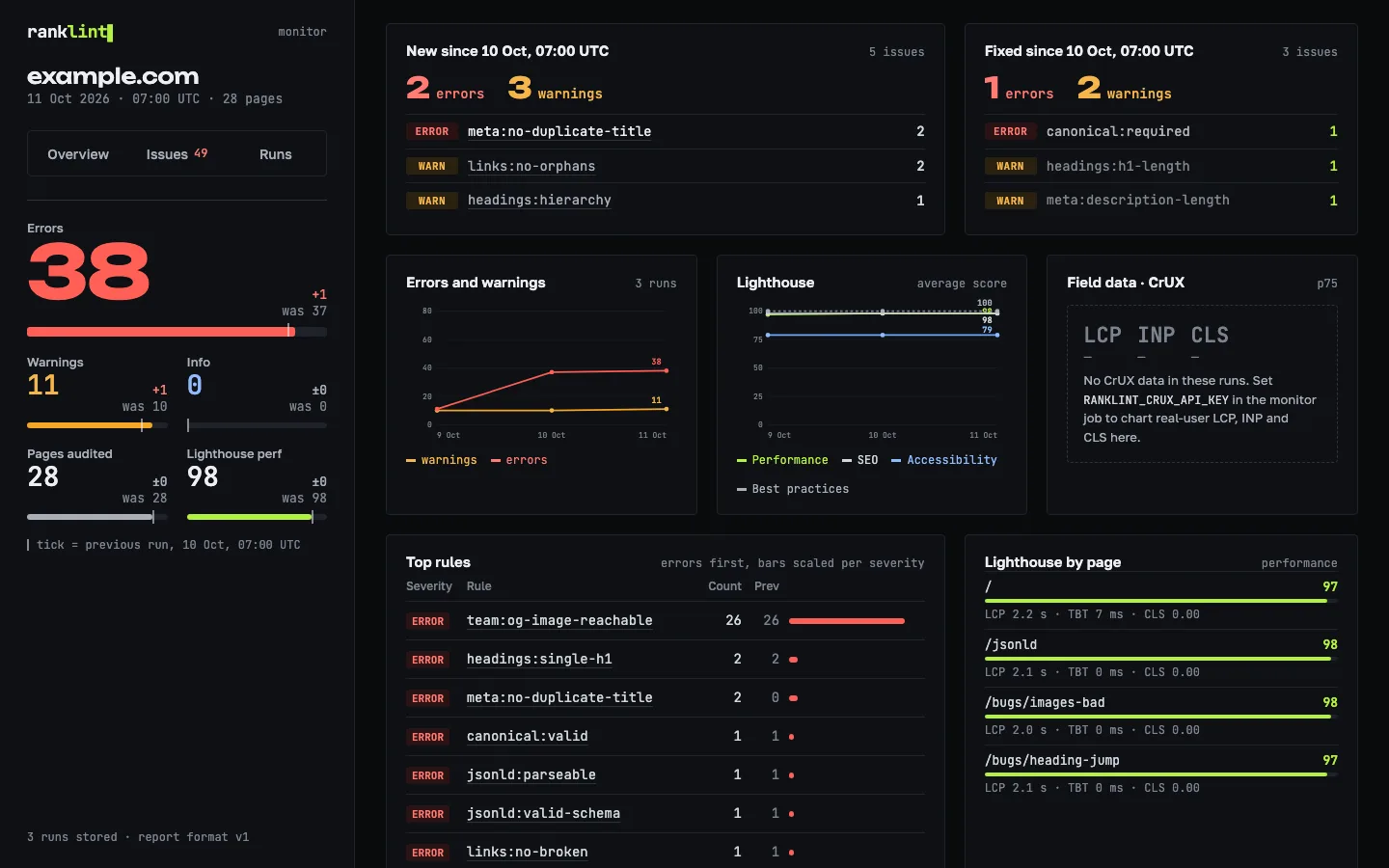
Charts appear from the second run. A rule or page clicked in any panel opens in the explorer.
The explorer groups issues by rule or by page and filters them by severity, text, site section, locale and "only new". A locale is the first path segment when it looks like a language code (de, pt-br). The section filter shows pages and issues per section. The "Fix once" block lists issues that repeat on at least 5 pages and cover at least 40% of the site or 80% of a section: these usually come from one template or component. A page card is a checklist of rules with how to fix, a docs link, NEW marks and the affected elements with a copy button. Without JavaScript the explorer is a static list of <details> blocks.

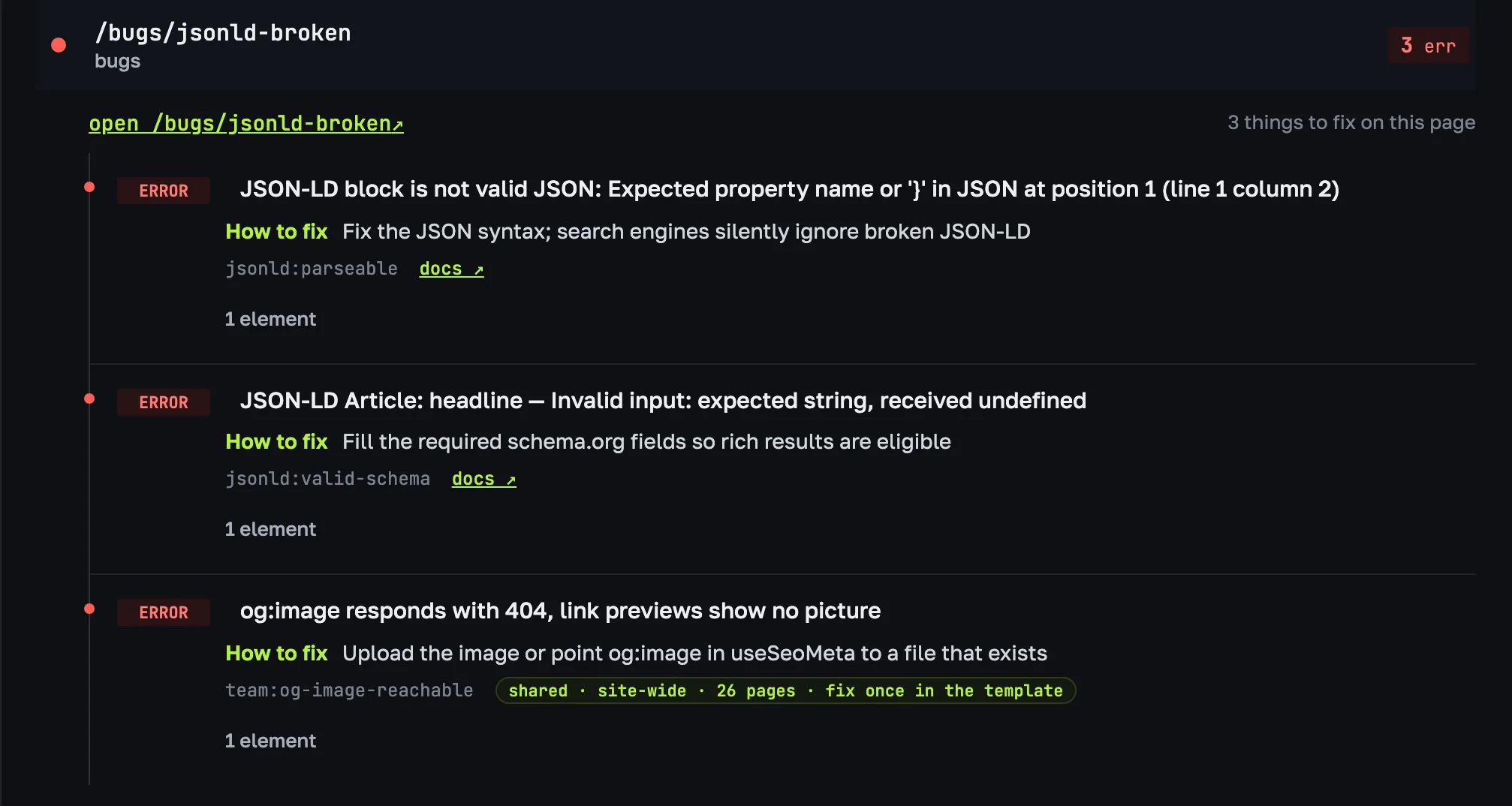
runs/<key>.html uses the same explorer, grouped by page by default. NEW marks and deltas there are counted against the previous stored run. The html report also shows CrUX p75 rated by the Google thresholds and Lighthouse by page.
GitLab Pages with history: reports live in public/reports, and before each run the job restores the previous public/ from the artifacts of the last pages job, so the archive grows without extra storage. keep caps it.
monitor: { storage: 'fs', dir: 'public/reports', keep: 90 },
include:
  - remote: 'https://raw.githubusercontent.com/aakazancev/ranklint/main/presets/gitlab-ci/seo.yml'

pages:
  extends: .ranklint-base
  rules:
    - if: $CI_PIPELINE_SOURCE == "schedule"
    - if: $CI_PIPELINE_SOURCE == "web"
  script:
    - command -v unzip > /dev/null || (apt-get update -qq && apt-get install -y -qq unzip)
    - >
      curl --fail --silent --location --output public.zip
      --header "JOB-TOKEN: $CI_JOB_TOKEN"
      "$CI_API_V4_URL/projects/$CI_PROJECT_ID/jobs/artifacts/$CI_DEFAULT_BRANCH/download?job=pages"
      && unzip -q -o public.zip || true
    - ranklint audit --url https://example.com --mode monitor
    - ranklint dashboard --dir public/reports --out public --run-url "$CI_PROJECT_URL/-/pipelines/new"
  artifacts:
    paths:
      - public
|| true covers the first run, when there are no artifacts yet. The "Run audit" link opens the GitLab "Run pipeline" page; the web rule lets a manually started pipeline run the job. The page holds only the link, no tokens. The stored JSON reports are published along with the dashboard under public/reports.